NOAA Weather Unofficial
- 4.7
- Rating
- 1.00M
- Installs
- Free
- Price

 Analysis by App-foxy
I like weather apps that stay focused on the question I actually need answered: what is happening near me, and what is likely to happen next. NOAA Weather Unofficial takes that straightforward approach. It is a free weather app from Granite Apps, built around NOAA forecasts and radar for an exact location rather than a broad, generic city view. After spending time with it, I found its appeal easy to understand: it is less about decorative presentation and more about getting dependable weather information on screen without turning the experience into a news feed.
That focus makes it a useful choice for people who check conditions before commuting, walking the dog, planning outdoor work, or deciding whether a trip is sensible. It is also a good fit for anyone who prefers official U.S. weather information over a heavily branded forecast service. At the same time, the app is not automatically the best choice for every weather habit. If you want a highly visual interface, extensive lifestyle content, or a polished ecosystem of extras, you may find it more limited than larger mainstream alternatives.
What NOAA Weather Unofficial actually offers
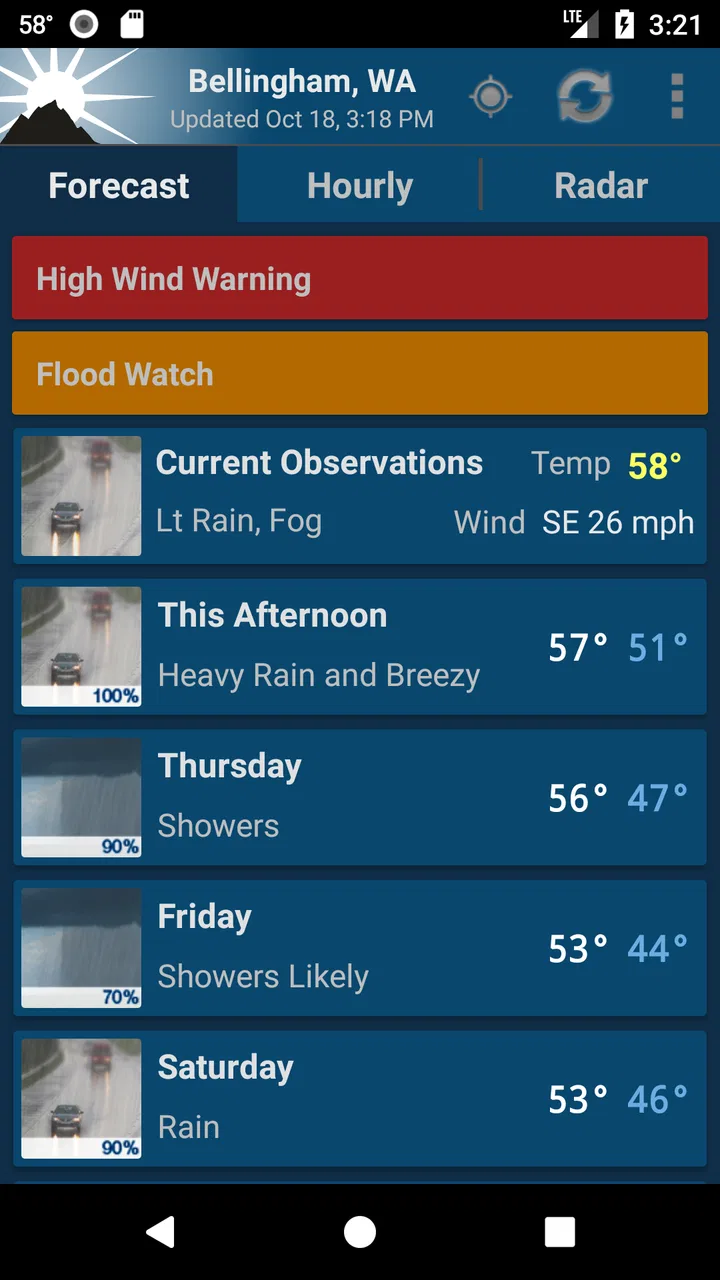
The app belongs to the weather category, and its central job is clear: combine NOAA forecast information with radar around your location. That sounds simple, but the simplicity matters. Many weather apps compete for attention with headlines, videos, alerts, air-quality panels, pollen reports, travel tools, and advertising-heavy layouts. Here, I found the NOAA connection to be the defining reason to install it, not merely a source label buried beneath a colorful interface.
You May Also Like

 Blood Strike: 2.5 Anniversary
Blood Strike’s Loadouts Turn Every Drop Into a Tactical Gamble
A close look at Blood Strike’s custom loadouts: how fast access to signature weapons reshapes its battle royale rhythm, rewards preparation, and narrows the gap between fights.

 Pandora - Music & Podcasts
Pandora’s Music Is Easy to Start, but Harder to Recover
Pandora’s strength is its low-effort path from a seed to a station. Its weak spot is how much confidence it asks you to place in connection, setup, and quiet recovery.

 8 Ball Pool
 Is Built on Rivalries, Rematches, and Routine
A close look at the rivalries, rematches, shared routines, and unanswered safety questions that turn a quick pool match into a persistent mobile community.

 Samsung Music
’s Quiet Strength Is Playing What You Already Own
Its reach comes less from spectacle than from dependable access to a personal library. That simplicity is both the app’s strongest retention engine and its ceiling.

 AccuWeather: Weather Radar
AccuWeather Review: A Quick, Clear Forecast for Everyday Decisions
For everyday plans, the best forecast is the one you can understand quickly. AccuWeather makes rain timing, radar, and local conditions easy to act on, with a few trade-offs.

 Hill Climb Racing
Why Hill Climb Racing Still Turns Crashes Into One More Run
A tiny car, a bumpy hill and one more upgrade: Hill Climb Racing keeps resurfacing because its simple chaos makes every near-miss feel personal.
More From Our News Desk



Granite Apps has maintained the application since its release on February 26, 2012. Its current version is 2.16.2, and it runs on Android devices using Android 4.4 or later. That older minimum requirement is useful if you keep an aging phone for travel, work, or outdoor use. It also tells me that the app is aimed at broad accessibility rather than only the newest hardware.
The public response is strong: NOAA Weather Unofficial holds a 4.7 average from around 105 thousand ratings, with roughly 35 thousand written reviews, and it has passed one million installs. Those figures do not prove that every person will enjoy the interface, but they do show that the app has built a substantial audience over time. The Everyone content rating also makes it suitable for general household use rather than a narrowly restricted audience.
The name includes “Unofficial,” which is worth taking seriously. I would treat the app as a convenient way to view NOAA-based information, not as NOAA itself. That distinction is practical: for serious storm decisions, I would still compare what I see here with official emergency instructions and local authorities. A weather app can help me understand conditions, but it should not replace evacuation orders or safety guidance.
The cost is easy to understand
NOAA Weather Unofficial is free. That gives it an immediate advantage over any weather tool that places its useful forecast behind a subscription or a paid upgrade. There is no purchase decision to make before testing the app in your own neighborhood, and that makes the download low risk for someone who wants a NOAA-centered alternative to the weather app already installed on a phone.
Free access changes how I judge the application. I do not expect the same breadth of extras that a paid weather service might provide, and I would rather see a focused free tool perform its main job well than pay for features I never use. The value here comes from access to local forecast and radar information without an entry fee, not from a promise of a premium content package.
For that reason, I would not choose it because I assume it delivers every advanced feature found in subscription-based competitors. I would choose it because the core information is available without payment. If your decision depends on a particular premium function, you should inspect the current app experience before making it your only weather source. The confirmed price is free; the sensible evaluation is whether the focused NOAA workflow matches your needs.
How I use it in an ordinary day
A realistic example is a morning commute followed by an outdoor appointment. I would first check the forecast for my exact location rather than relying on a broad regional label. Then I would open the radar before leaving, especially if the sky looked harmless but rain was developing nearby. The forecast answers the planning question, while radar helps me judge whether current precipitation is approaching, passing, or staying away.
That two-step habit is more useful than repeatedly refreshing a single temperature number. On a day when I am deciding whether to cycle, walk, or drive, I want both the expected conditions and a view of what is already moving through the area. NOAA Weather Unofficial is well suited to that quick check because its identity is built around those two sources of information.
A second useful workflow is checking the app before starting a task that cannot easily be paused, such as gardening, painting outside, or taking a child to a park. I would look at the forecast early, then use radar closer to departure. This avoids treating a morning forecast as a guarantee for the whole day. Radar is not a perfect long-range planning tool, but it can reveal an approaching band of rain that a casual glance at the temperature would miss.
I also appreciate the value of checking the exact location instead of assuming that a nearby city has identical conditions. Weather can change noticeably across short distances, particularly around coasts, hills, open fields, and dense urban areas. The app’s location-centered purpose encourages a better habit: verify the place that matters to you rather than accepting the first city name suggested by a generic service.
Where the focused design helps
The strongest benefit is clarity of purpose. When I open a weather app, I do not always want an article about a heat wave or a collection of lifestyle recommendations. Sometimes I want the forecast and radar with as little detouring as possible. NOAA Weather Unofficial makes sense for that kind of user, especially someone who already knows how to interpret basic weather information and does not need a tutorial wrapped around every screen.
The NOAA emphasis can also be reassuring for users who prefer a recognized public forecasting source. I am not saying that a NOAA-based display makes every prediction perfect; weather remains uncertain, and local conditions can shift quickly. The advantage is that the app’s identity is connected to a source many U.S. users already seek when they want forecast and radar information rather than a purely commercial presentation.
Its age is another quiet strength. An application that has been available since 2012 and still supports Android 4.4 or later may be a practical option for people who cannot or do not want to replace an older handset. I would not assume that an older minimum operating-system requirement means every screen will feel modern, but it does make the app more approachable for devices that newer weather products may ignore.
The free price also makes it valuable as a second opinion. I could keep my phone’s default weather widget for a quick glance and use this app when I want to inspect NOAA forecast information or radar. That arrangement is especially sensible if I already like the convenience of a built-in widget but want a more focused tool for checking conditions before an outdoor decision.
Trade-offs I noticed while judging it
The same focus that makes the app appealing may feel restrictive. People who expect a weather app to combine forecasts with news, severe-weather education, travel planning, health information, and richly animated visualizations may find the experience too narrow. I would not install this expecting a complete lifestyle weather platform. Its value depends on whether forecast and radar are the features you use most.
Radar also requires sensible interpretation. A radar image can show precipitation patterns, but it does not automatically tell me how heavy rain will be at my front door several hours from now. The image can be more useful when I look at its movement and relate it to the timing of my plans, rather than treating a colored patch as a precise promise. This is not a flaw unique to the app, but it is an important limitation for anyone who has not used radar before.
Exact-location weather can create a different kind of friction too. If I am traveling, moving between neighborhoods, or checking a destination away from home, I need to be deliberate about which location I am viewing. A location-centered app is most useful when I confirm that the displayed place is the one relevant to my decision. That extra attention is worthwhile, but it is less effortless than a broad home-screen glance.
I would also be cautious about using any single weather app as the final authority during dangerous conditions. For ordinary planning, this tool can be very helpful. During a major storm, I would cross-check official warnings and local emergency communication. The app can support a decision, but no forecast screen should encourage false confidence when conditions are changing rapidly.
Who is likely to get the most value
I would recommend NOAA Weather Unofficial to someone who wants a free, practical weather reference with a clear NOAA and radar focus. It is particularly suitable for U.S. users who regularly check local conditions before outdoor activities and who prefer information over entertainment. It also deserves consideration from people using older Android hardware, since the minimum operating-system requirement is Android 4.4 or later.
It is a good match for a commuter who wants to check rain before leaving, a runner deciding whether to change a route, a parent planning time in the park, or a homeowner watching conditions before outdoor maintenance. In each case, the useful pattern is the same: use the forecast to plan, then use radar to refine the immediate decision. That is more actionable than simply asking whether the temperature is high or low.
I would also suggest it to users who dislike subscription pressure. Because the app is free, it can be tested alongside an existing weather service without committing money. If it gives you the local forecast and radar view you need, it may replace a more cluttered app. If you prefer your current service’s widgets or broader information, it can still serve as a focused backup.
On the other hand, I would skip it if your priority is a highly polished visual experience or a broad collection of specialized weather categories. Someone who wants an all-in-one dashboard for travel, health, news, and environmental conditions may be happier with a larger general-purpose weather platform. I would also skip relying on it alone if your main need is emergency communication; for that, local authorities and official alerts should remain central.
Small habits that make the app more useful
My first tip is to separate planning from checking. Use the forecast when deciding what your day might look like, but use radar closer to the activity itself. This reduces the common mistake of treating an earlier forecast as a live picture of the sky. The app’s combination of NOAA information and radar supports that two-stage routine naturally.
My second tip is to check the location before making a decision that matters. If you are visiting a nearby town, working across a large metro area, or heading toward a trail, do not assume your home location represents the destination. The difference may be small or significant depending on terrain and weather movement. A quick location check can prevent a surprisingly avoidable mistake.
My third tip is to use it as a calm reference rather than a source of constant reassurance. Refreshing weather information every few minutes will not make an uncertain forecast certain. I get more value by checking at sensible decision points: before leaving, before starting an outdoor task, and when radar suggests a system is approaching. That keeps the app useful without turning weather checking into a distraction.
Finally, I would keep the app’s role clear during severe conditions. Use it to understand the forecast and radar, but follow emergency instructions from the appropriate local sources. This is the most important trade-off in any weather application: convenience is not the same as authority, and a clean forecast screen should never outweigh a direct safety warning.
My final recommendation
NOAA Weather Unofficial is a strong free choice for focused forecast and radar checking. I like it because the purpose is easy to understand, the price removes the barrier to trying it, and the NOAA-centered approach suits people who want practical information instead of a crowded weather portal. Its long availability, broad Android compatibility, and strong user response make it a credible option rather than an app I would dismiss after a quick glance.
Its limitations are equally clear. It is not the app I would choose for a large collection of lifestyle features, elaborate presentation, or a complete emergency-information system. The radar still requires judgment, exact-location checks take a little care, and serious weather decisions deserve confirmation through official local communication.
For my own use, I would install it when I wanted a straightforward NOAA weather reference that could sit beside a default phone widget or replace a cluttered forecast app. The free access makes experimentation easy, and the best results come from using the forecast for broad planning and radar for near-term choices. If that is how you think about weather, Granite Apps’ focused approach delivers real value without asking you to pay first. If you want a richly featured weather universe, look elsewhere; if you want a dependable, uncomplicated place to begin checking local conditions, this is worth trying.
FAQs for NOAA Weather Unofficial
01What features does the NOAA Weather Unofficial app offer?
NOAA Weather Unofficial provides detailed weather forecasts, real-time alerts, radar images, and satellite views. It offers hourly and weekly weather updates, includes information about precipitation, temperature, wind speed, and severe weather alerts. The app also allows for customization of locations, ensuring users receive relevant local weather information.
02Is NOAA Weather Unofficial free to use, or are there in-app purchases?
NOAA Weather Unofficial is free to download and use, but it offers in-app purchases. These purchases typically include options to remove ads or to access premium features, such as advanced radar options or additional data layers. The basic features remain accessible without any cost, providing essential weather information.
03How accurate is the weather data provided by NOAA Weather Unofficial?
The app sources its data directly from the National Oceanic and Atmospheric Administration (NOAA), known for its reliability and accuracy. However, like any weather forecasting tool, it may not always predict weather changes perfectly. It's advisable for users to stay updated with regular checks, especially during severe weather conditions.
04Can I customize alerts and notifications in the NOAA Weather Unofficial app?
Yes, the app allows users to customize alerts and notifications based on personal preferences. You can set alerts for specific weather conditions like severe storms, rain, or temperature changes. This customization helps users receive timely updates relevant to their needs, enhancing the app's usability and effectiveness.
05Is NOAA Weather Unofficial available for both Android and iOS devices?
Yes, NOAA Weather Unofficial is available for download on both Android and iOS devices. Users can find the app on the Google Play Store for Android devices and the Apple App Store for iOS devices. The app maintains a consistent interface and functionality across both platforms, ensuring a seamless user experience.
Pros
- Accurate weather forecasts daily.
- Detailed radar and satellite images.
- Customizable weather alerts.
- User-friendly interface design.
- Supports multiple locations easily.
Cons
- Some ads can be intrusive.
- Limited offline functionality.
- Occasional data update delays.
- Premium features require payment.
- Interface lacks customization options.

NOAA Weather Unofficial
Gallery